
 Shiina Labs
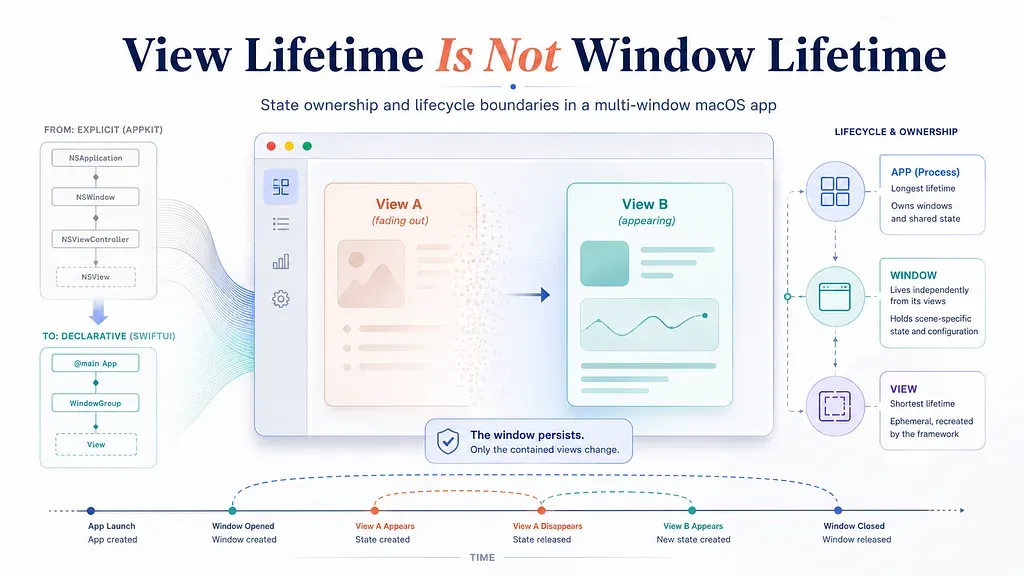
AppKit begins with an explicit window object, while SwiftUI begins with declarative scenes and views. The views may change or be recreated while the underlying window — and its window-scoped state — continues to exist.
Before SwiftUI, most native macOS applications were built directly on AppKit, historically with Objective-C and later with Swift as well. The important distinction, however, is not Objective-C versus Swift. It is AppKit’s explicit object model versus SwiftUI’s declarative one.
In a traditional AppKit application, a window is a concrete object with a stable identity. An NSWindow is often managed by an NSWindowController, and a multi-window application typically has a separate controller for each window. The relationships are visible: this controller owns this window, this window has this state, and this callback runs when that specific window closes.
That does not mean AppKit applications are immune to lifecycle bugs. Complex software can mismanage ownership under any framework. But AppKit makes the window itself difficult to ignore. Window-level state naturally tends to live in a window controller, document, or another object whose lifetime is explicitly tied to that window.
SwiftUI changes the starting point.
Instead of constructing a window controller and installing content into its window, we declare a Scene and describe the views it should contain. A WindowGroup can produce multiple independent windows from the same declaration. SwiftUI decides when to create and rebuild views, while much of the mapping between those declarations and the underlying AppKit objects remains behind the framework.
This is one of SwiftUI’s strengths. It removes a great deal of mechanical window and view management. But it also makes some ownership boundaries less visible.
In AppKit, we tend to begin with the question: “Which window is this?”
In SwiftUI, we are more likely to begin with: “Which view is currently being displayed?”
That difference matters when a feature appears inside a view but does not actually belong to that view.
I encountered this during a multi-window refactor of a production macOS application. The application had a long-running session that could be started from one page. Once started, the session was expected to continue while the user navigated to other pages in the same window. It should stop only when the user explicitly stopped it or closed that window.
Instead, changing routes sometimes stopped the session. After multi-window support was introduced, the failure became more serious: closing one window could affect a session that was still running in another.
The initial implementation did not look unreasonable. The view created its controller, started work when it appeared, and cleaned up when it disappeared.
struct SessionView: View {
    @State private var session = SessionController()
    var body: some View {
        SessionContent(session: session)
            .onAppear {
                session.start()
            }
            .onDisappear {
                session.stop()
            }
    }
}
If the session genuinely belongs to this page, the code may be correct. A page-scoped task can begin with the page and end when the page disappears.
But that was not the product behavior in this case.
The session belonged to the window.
A SwiftUI view can disappear because the user changed a sidebar selection, followed a different navigation path, or triggered a state update that caused SwiftUI to restructure the view tree. None of those events means that the containing macOS window has closed.
The mistake was not that onDisappear behaved unpredictably. The mistake was assigning window-destruction semantics to a view-level event.
A disappearing view and a closing window are not the same lifecycle boundary.
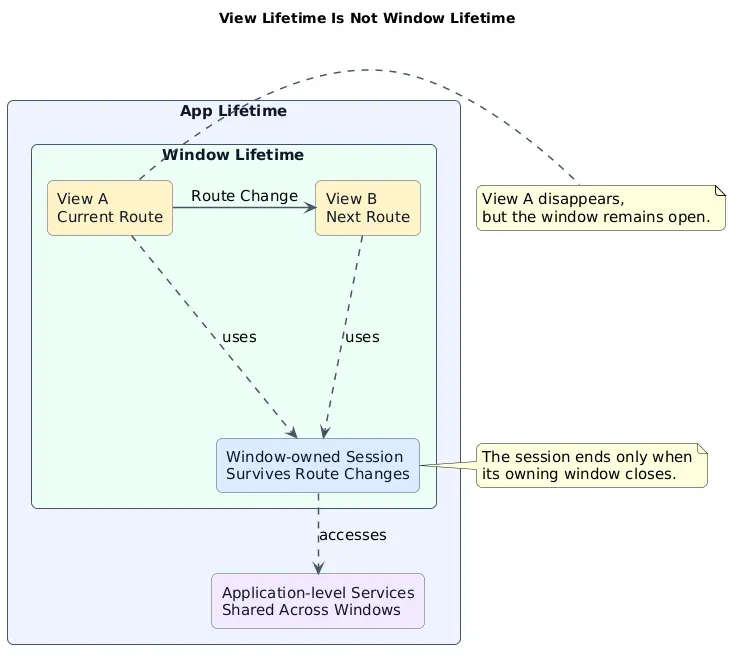
A route change can destroy one view and create another while the window-owned session continues to exist.
The first diagram captures the central relationship. A view exists inside a window, and the window exists inside the application. The lifetimes can overlap, but they are not interchangeable.
When the user moves from View A to View B, View A may be destroyed and View B may be created. The window remains open throughout the transition. If the session belongs to that window, it must survive the route change as well.
This led to a more important question than which SwiftUI property wrapper to use:
Who actually owns this state?
Moving state upward is not enough
State management discussions in SwiftUI often focus on mechanisms: @State, @StateObject, observation, environment injection, or dependency containers. Those mechanisms determine how state is created, retained, and propagated. They do not determine how long the state should conceptually exist.
That decision has to come from ownership.
A typical application contains state at several different lifetime levels. Search text, expanded panels, temporary selections, and similar presentation details may belong to an individual view. They can disappear when that page is destroyed.
A running session, a window’s navigation position, or the resources acquired on behalf of that window need to survive page changes. They belong to a window.
Database connections, global settings, caches, and low-level services may be shared by several windows. They belong to the application.
The first implementation placed the long-running session too low, inside a page. The obvious response was to move it upward so that route changes would no longer destroy it.
That solved one symptom but created another.
The state had been promoted so far that all windows began sharing the same instance.
Window A and Window B looked independent, but both were controlling the same session object. A state change in one window became visible in the other. More importantly, when one window cleaned up the shared session, the other lost something it still depended on.
This is why “move the state upward” is not a sufficient design rule.
State should not simply be moved high enough to avoid destruction. It should be moved to the level of its actual owner.
In this case, each window needed its own session state.
@MainActor
final class WindowSession {
    let task = TaskController()
    private var hasTornDown = false

    func tearDown() {
        guard !hasTornDown else { return }
        hasTornDown = true
        task.stop()
    }
}
The class itself is not the important part. The important part is the ownership statement it represents:
One window owns one window session.
Views can display and control that session, but they do not own its lifetime. The application can register and locate it, but it should not collapse multiple windows into the same session instance.
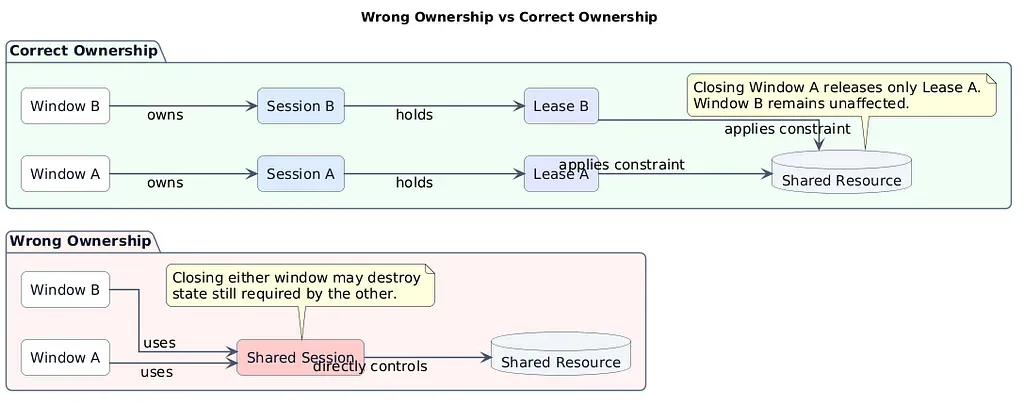
Moving state upward is not enough. Each window needs its own session, while access to the shared resource is represented by independent leases.
The left side of the second diagram shows the misleadingly simple model: two windows connected to one shared session. It avoids recreating state during navigation, but it destroys isolation between windows. Closing either window can now affect the other.
The right side models ownership more accurately. Window A owns Session A. Window B owns Session B. Both sessions can still use the same underlying application service, but neither window directly owns that service.
Instead, each session holds an independent lease.
This distinction became necessary because the long-running sessions imposed temporary constraints on a shared resource. While a session was active, the shared service needed to run with a more demanding configuration. When the session ended, that constraint could be removed.
A naive implementation might directly change a global value when the session starts and restore it when the session stops:
sharedService.interval = 1
// Later
sharedService.interval = 10
This works with one window. It fails with two.
Suppose both Window A and Window B are running sessions that require the interval to remain at 1. If Window A closes and restores the interval to 10, it has overridden a requirement that Window B still holds.
The underlying issue is again ownership. Window A does not own the shared service’s configuration. It only owns its own request for a stricter configuration.
That request is better represented as a lease. Session A acquires Lease A, and Session B acquires Lease B. The shared service computes its effective configuration from all active leases. Closing Window A releases only Lease A. As long as Lease B remains active, the service must continue satisfying Window B’s requirement.
This also requires separating the configuration the user has requested from the configuration that is currently effective.
The user may change the preferred interval while one or more sessions are still active. A strict lease may temporarily prevent the new value from taking effect, but once the final lease is released, the service should restore the user’s latest requested value — not a stale value captured when the first session started.
The lease model solves more than cleanup. It expresses the fact that a shared resource can have multiple simultaneous stakeholders, none of which is allowed to unilaterally reset global state.
A SwiftUI Scene is still not a concrete window identity
Once the state had been moved to the window level, another question remained: how does the application know which window has actually closed?
SwiftUI provides Scene-level structure, but on macOS, activation, focus, and closing ultimately occur on real NSWindow instances. When exact window identity matters, relying on a single global reference to “the current window” is not sufficient.
Consider a simple sequence. Window A registers first, so a global window reference points to A. Window B opens later and replaces that reference. Window A then closes. If cleanup uses the global “current window,” the application may attempt to clean up B, fail to locate A, or release the wrong state.
The solution is not another global coordinator that stores one active window. Each real window needs its own registration record.
That record binds together the NSWindow identity, the corresponding Scene identity, the window-owned state, the notification observers installed for that window, and the callbacks required for activation and cleanup. When an AppKit notification arrives, the application resolves it through the actual NSWindow that produced the event.
This makes window closure precise. Window A’s notification can only locate Window A’s registration. Its observers, state, and resource leases can be removed without touching Window B.
The registration process itself introduced a subtler lifecycle problem.
By the time SwiftUI exposes the underlying NSWindow and the application installs its lifecycle observers, the window may already have become key or main. If the activation event occurs before the observer is installed, and no later activation event happens, the application can miss that transition permanently.
This is particularly visible when an application needs to deliver a pending navigation request or user action to whichever window becomes active. The target window may already be active before the registration process finishes, but the state that should receive the request may not yet exist.
The fix is to treat registration as a two-phase state transition rather than a single assignment.
First, the lifecycle coordinator claims the real window and establishes its registration identity. It installs the necessary observation and records whether the window is already active. The application then finishes connecting the Scene, window state, routing, and resource callbacks. Only after those relationships are ready does it commit the registration.
If an activation occurred before the registration was complete, the coordinator replays that activation after the commit.
This is not about fabricating an AppKit notification. It is about preserving an event that arrived before its consumer was ready.
The broader lesson is that lifecycle registration can race with the lifecycle itself. Even in code that runs on the main actor, framework events can occur before application-level relationships have been fully assembled.
Closing a window should follow the real lifecycle path
Once ownership is explicit, window cleanup becomes a chain rather than a callback attached to a convenient view.
The user closes a concrete NSWindow. AppKit emits a closing event for that window. The lifecycle coordinator resolves the corresponding registration. The window registry removes the state owned by that window. The session stops its own work and releases its own lease. Finally, the shared service recomputes its effective configuration from the leases that remain.
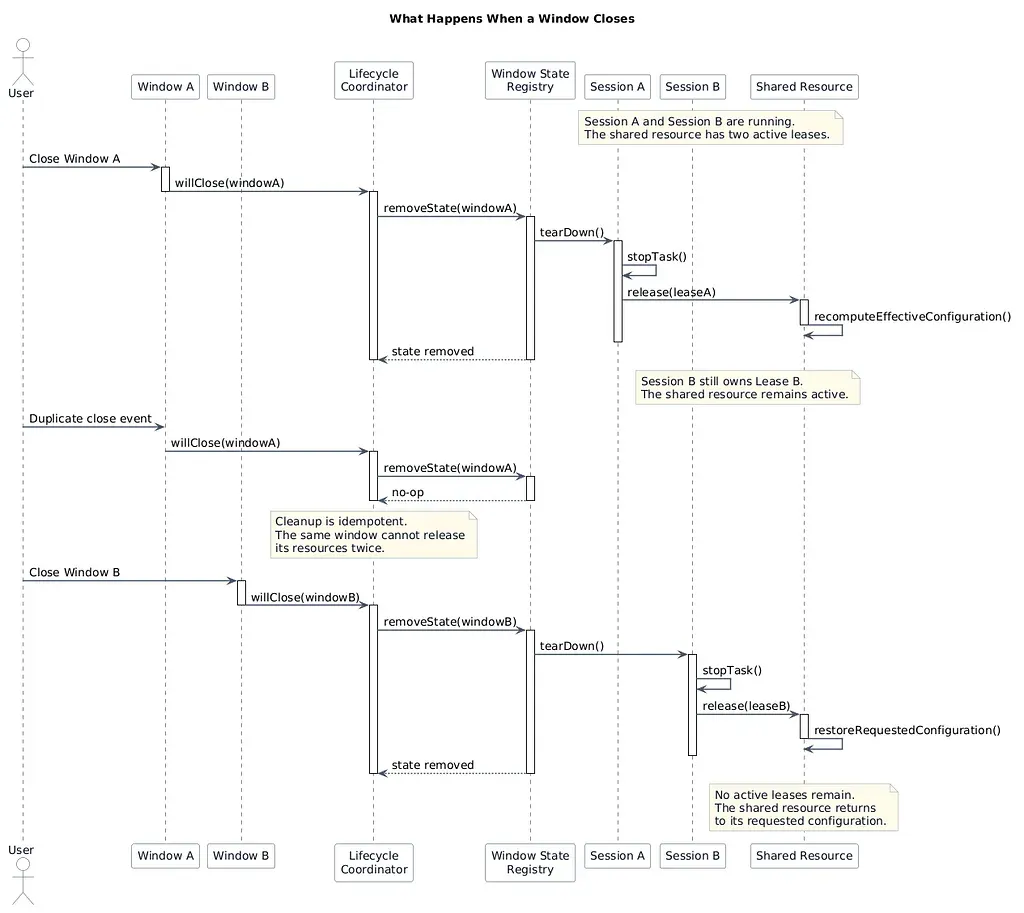
Window closure travels through the production lifecycle path. Each window releases only its own state and lease, and repeated close events remain safe.
The third diagram shows why this chain matters.
When Window A closes, only Session A is torn down and only Lease A is released. Session B remains active, so the shared resource continues operating under Lease B’s constraints.
If Window A’s close event is processed again, the second attempt becomes a no-op. Its state has already been removed and its lease has already been released.
Only when Window B later closes and releases the final lease can the shared resource return to its normal requested configuration.
This makes idempotence a basic requirement of lifecycle cleanup.
Window closing, Scene destruction, and application termination can overlap or reach cleanup through different paths. A design that assumes a teardown method will be called exactly once is relying on a fragile condition. Cleanup should be safe whether it is requested once or several times.
The same ownership chain also changed how the feature needed to be tested.
A direct unit test can prove that calling tearDown() stops a task:
func testTearDownStopsTask() {
    let session = WindowSession()
    session.task.start()
    session.tearDown()
    XCTAssertFalse(session.task.isRunning)
}
That test is useful, but it does not prove that the application lifecycle works.
It does not prove that window observers were installed correctly. It does not prove that an event from Window A resolves to Window A’s state. It does not detect two windows accidentally sharing one session. It does not prove that releasing one lease leaves another window’s lease intact. It also cannot reveal whether repeated close events trigger duplicate cleanup.
The meaningful regression scenario had to exercise the production path.
Two independent windows were created. Each owned its own session, while both sessions used the same shared service. Both sessions were started before either window closed.
Closing the first window had to stop only its session. The second session had to remain active, and the shared service had to retain the remaining lease. Processing the first window’s close event again had to produce no additional release. Only after the second window closed could the shared service return to the user’s requested configuration.
That test does not merely verify a method. It verifies an ownership chain:
real window event → window registration → window-owned state → session teardown → lease release → shared-resource recomputation
The distinction is important because lifecycle bugs often survive local unit tests. Every internal method can behave correctly while the production event travels through the wrong object identity or enters at the wrong architectural level.
Lifecycle bugs are usually ownership bugs
The original symptom was simple: changing pages stopped a task.
Following it far enough exposed a much larger set of questions.
Why was the session created inside a page? Why did two windows share one state object? Why was one window allowed to restore an application-wide configuration? Why could a window already be active before its registration was ready? Why did direct teardown tests pass while the real closing path remained unsafe?
All of these questions eventually led to the same conclusion:
Lifecycle problems are often ownership problems in disguise.
The location where an object is created does not automatically determine its owner. A callback firing at a particular moment does not mean it represents the correct lifecycle boundary.
Ownership has to be defined before choosing the storage mechanism or cleanup callback.
State that should disappear with a page belongs to the View. State that should survive navigation but remain isolated to one window belongs to the Window Scene. Services shared by several windows belong to the application. A window may release its own session and its own lease, but it must not directly reset a resource that other windows are still using.
SwiftUI encourages us to organize applications from the View outward. That is often productive, but it does not mean every piece of state belongs to a View or should follow onAppear and onDisappear.
In small applications, the lifetimes of the View, Window, and App may overlap so closely that an incorrect ownership model appears to work. Complex navigation, multiple windows, long-running sessions, and shared resources eventually separate those lifetimes and expose the mismatch.
Some of the implementation and review work behind this refactor was assisted by AI. It was useful for generating code, expanding tests, and challenging individual design decisions. But the central questions still required an explicit engineering model: what owns the state, how long it should live, which system event is authoritative, and what evidence is sufficient to prove the complete lifecycle path.
The most important result of the refactor was not a particular SwiftUI property wrapper, AppKit API, or coordinator type. It was a more general design principle:
Lifetime is not determined by where the code is written. It is determined by how long the state or resource is supposed to remain valid.
Once the View, Window, and App lifetimes were treated as separate boundaries, the previously intermittent behavior became much easier to explain. Route changes no longer meant session termination. Closing one window no longer affected another. Shared resources were no longer controlled by whichever user happened to release them first.
That separation is not merely a workaround for SwiftUI.
It is the ownership model a stable multi-window application requires.