
 Shiina Labs

Photo: Marketing Online / Unsplash
Making It a Little Harder to Go Back to Sleep
My schedule tends to fall apart on my days off. I often wake up around 11 a.m., and sometimes it is nearly noon by the time I open my eyes. After washing up, it is already time for lunch. Then the post-lunch drowsiness sets in, and it feels as though I have barely finished starting up before I am ready to shut down again. Unless I have somewhere specific to be that day, I will probably scroll through my phone for a while and eventually climb back into bed.
I used to blame this on my poor sleep schedule or a lack of self-discipline. It took me a while to realize that my surroundings were also part of the problem. I work, relax, and sleep in the same bedroom, with only a few steps between my desk and my bed. I write code, watch videos, and play games from the same spot. When I get tired, all I need to do is stand up, take a few steps, and lie down. Activities that should probably occupy separate parts of my life have all been compressed into the same room.
A bedroom does not give me a clear signal about what I am supposed to be doing. Sitting at my computer could mean working or relaxing; the moment I leave the desk, the bed is right there. Even when I intend to get something done after lunch, sleep immediately becomes the easiest option as soon as I start feeling tired. That ease is quite literal. It takes only three movements: stand up, turn around, lie down.
Starting work requires more effort. I have to push through the drowsiness, sit back at the desk, open the project, remember where I left off, and gradually pull my attention back into it. All the while, the bed remains in view, reminding me that there is a much easier alternative. Most of the time, I do not carefully compare my options and consciously decide to be lazy. I simply drift toward the one with the least resistance. Going to sleep requires almost no effort. Entertainment does not require much either. Work is the only option that needs an extra push.
That day, I decided to change my surroundings and take my Mac to the coffee shop downstairs. I do not consider coffee shops ideal places to work, nor was I trying to present myself as some independent developer who spends his days coding over coffee. Carrying a laptop downstairs and sitting there alone for a long time after ordering something still made me feel slightly awkward. My goal was much simpler: I just wanted to put some distance between myself and my bed.
Going to the coffee shop meant getting dressed, packing my computer and charger, going downstairs, finding a seat, and ordering something. On the surface, working outside was clearly more troublesome than staying in my bedroom. But all of that friction came before I started. Once I was already sitting in the shop, the situation reversed. My computer was open, I had ordered something, and I was unlikely to pack everything up again after only a few minutes. Even if I became tired, there was no bed nearby to fall into. Going home to sleep would mean closing the computer, packing my things, leaving the shop, and walking back upstairs. What had previously required only a few movements had become an entire process.
I had not suddenly become more disciplined. I had simply moved the friction in a different direction. In my bedroom, stopping work was too easy. At the coffee shop, ending the session early required more effort. The environment did not force me to concentrate, nor did it put me into some magical state of productivity. It simply made staying there and doing something the more natural option at that moment.
Coffee shops have their own problems, of course. People talk, the music may not suit me, the furniture may not be comfortable, and I have to spend money to be there. If I stay too long, I also start wondering whether I am occupying a table for longer than I should. It is not a solution I can rely on indefinitely, and it certainly does not mean I should spend every day off working from a coffee shop. Still, the experience made me notice how an environment does more than affect my mood. It continually changes the amount of effort attached to each possible action.
I used to focus on reducing friction. I kept my computer within easy reach and put everything I needed in my bedroom. That did make it easier to start working, but it also made entertainment and sleep equally accessible. In the end, none of the options had much friction, so I had to rely on whatever state of mind I happened to be in at the time. That day, I did the opposite. Instead of optimizing my bedroom workflow again, I made going back to sleep slightly more inconvenient. Simply moving away from the bed was enough to change what was most likely to happen that afternoon.
I still do not know whether working from a coffee shop will become a regular habit. Perhaps I will eventually find another space, or rearrange my bedroom so that work and rest have clearer boundaries. But at least on that particular day, I did not go back to sleep after lunch. I sat downstairs, opened my computer, and prepared to get some work done.
Then the coffee shop’s network stopped working properly.
The Coffee Shop’s Network
My Mac connected to the Wi-Fi without any trouble. Messaging apps could still send and receive messages, but websites would not load. Twitter, ChatGPT, and several other sites I regularly use simply did not respond. It was not a complete loss of connectivity, which made the situation a little strange. macOS showed that Wi-Fi was connected, and some applications were clearly still communicating. I refreshed the pages several times and tried a few different websites, but the result was always the same.
I could not immediately tell where the problem was. It could have been the browser, DNS, a lingering system proxy configuration, or something about the coffee shop’s network itself. Continuing to troubleshoot would normally mean checking each of those possibilities one by one. As it happened, I had just built the first version of Network Self-Check for WiFi Lens a few days earlier, so I remembered that I could run it.
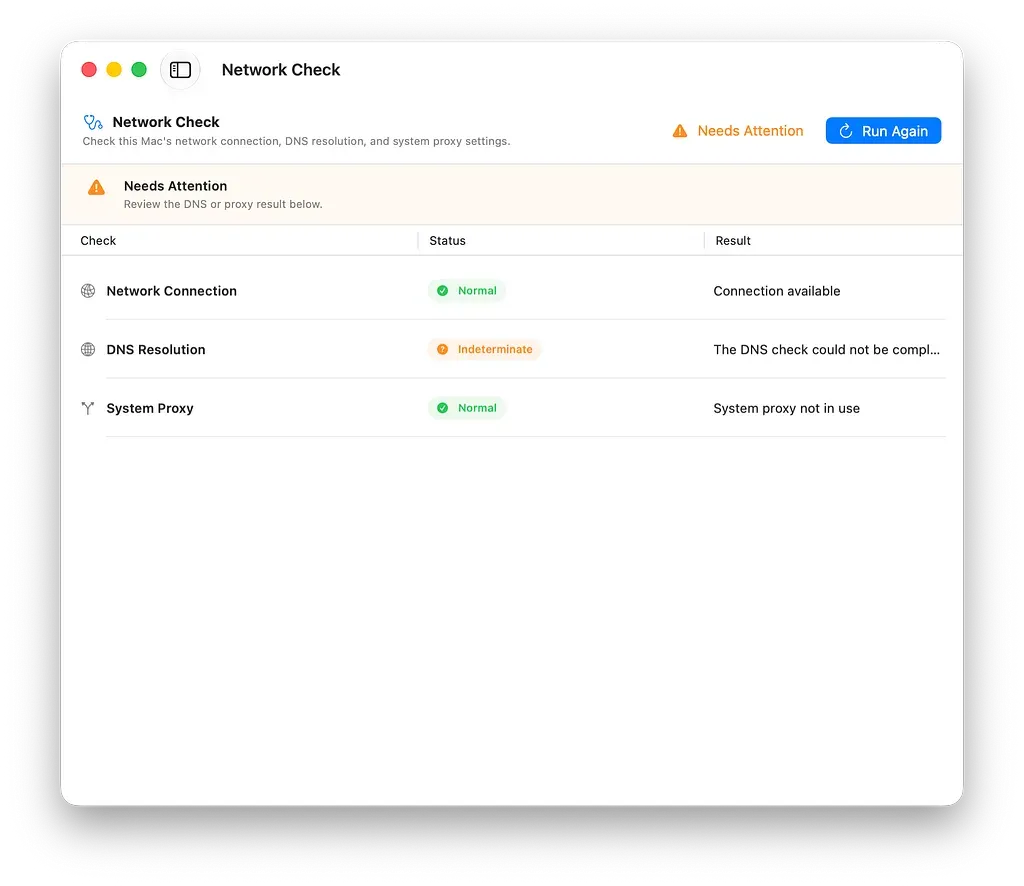
Network Self-Check pointed me toward DNS. It did not identify the full cause, but it gave me a useful place to start.
The feature was still very basic. The interface had only reached the point where it was usable, and the checks covered only the current network path, DNS resolution, and the system proxy settings in macOS. When an HTTP, HTTPS, or SOCKS proxy was explicitly configured, it would also try to connect to the corresponding address and port. It could not analyze VPN connections or complex routing. It could recognize that the system was using a PAC configuration, but it would not download or execute the script, let alone modify any network settings automatically.
My original intention was simply to cover a few basic and relatively common problems. I was not sure how useful it would be in a real situation. In fact, I suspected that when I eventually encountered an actual network problem, it might not find anything at all. Still, the feature was already on my computer, so I ran it. The result showed that DNS resolution had failed.
I checked my DNS settings and discovered that one of the resolvers I had configured manually was unreachable from the coffee shop’s network. It had always worked on the networks I normally used, so I had never paid much attention to the setting. I added a fallback resolver and opened the browser again. This time, the websites loaded normally.
That does not mean there was anything inherently wrong with the DNS service itself. More precisely, the resolver I had configured was unreachable from that particular network at that particular time. The result could have been completely different on another network. Network Self-Check did not identify the underlying cause either. It could not tell whether the resolver was unreachable because of the coffee shop’s network policy, the route between them, or something else along the path. It could only confirm that the DNS lookup had failed and display that result. I still had to investigate the configuration and make the change myself.
The hint happened to be useful, though. Before running the check, all I knew was that messaging worked while websites did not. After seeing the result, I checked DNS first instead of working through the browser and proxy settings one by one. It did not fully explain the problem. It simply saved me a few steps.
This was also the first time I had used the feature outside development and testing. I had always felt that its scope was too small. Network problems can be complicated, while the first version checked only a handful of basic components. Yet the first time I encountered a real issue, it happened to catch the relevant one. That did not mean the feature was now complete. With a different failure, it might simply report that the current network looked normal, or stop at a result that offered little practical guidance.
The problem that afternoon was related to DNS, but all the tool could establish was that a lookup had failed. It did not know why. This became one of the things I paid closer attention to when I later revised the wording of the results. A network check can easily present an abnormal observation as though it were a final diagnosis, but those are not the same thing. A DNS failure may come from a local configuration, the current network, the route to the resolver, or an upstream service. A proxy port being unreachable does not necessarily mean the proxy application itself is broken. If the interface states its findings too confidently, it may send the user down the wrong path.
I later included Network Self-Check in WiFi Lens 1.5.0, where it remains marked as Preview. This is its first public version, and its checks, result wording, and interface will continue to change. Diagnostic results and Wi-Fi scan data remain on the device. The DNS check performs a normal lookup, while explicit proxy checks only test TCP reachability to the configured address and port. They do not read proxy usernames or passwords.
I had gone to the coffee shop simply to get farther away from my bed. I had not planned to test WiFi Lens there. The shop’s network just happened to develop a problem, and my computer just happened to contain a newly built diagnostic feature.
So I ran it, and that day, it happened to be useful.
Note: Network Self-Check is included in WiFi Lens 1.5.0 and is available in both the open-source and Pro editions.
GitHub: https://github.com/ShiinaLabs/wifi-lens
Website: https://wifi-lens.shiinalabs.com